Unity数据持久化
目录
Unity数据持久化
一、概述
1、数据持久化
将内存中的数据模型转换为存储模型,以及将存储模型转换为内存中的数据模型的统称。
2、理解后缀名
文件后缀名决定了文件的格式,不同软件根据后缀名判断文件类型,并在打开文件时按特定规则解析它。
3、文章概述
本文章包含如下四种Unity数据持久化方式:
- PlayerPrefs
- XML
- JSON
- 二进制
每种方式都会简单列出相关知识点,并且最后还会将其做成管理器方便调用。该文章总结于唐老狮的数据持久化课程,由于是出自教程并且尚未优化过代码,因此管理器代码肯定还是有瑕疵的。主要是方便知识的回顾。
学习前可以去看下File相关的操作,在我的“C#之文件操作”文章中也有记录。同时需要理解反射相关知识。
4、文件路径(Windows为例)
- Application.dataPath(只读):程序的数据文件所在的文件夹路径,编辑器中为
Assets文件夹。 - Application.streamingAssetsPath(只读):返回数据流的缓存目录,适合存放一些外部数据文件,编辑器中为
Assets/StreamingAssets文件夹。 - Application.persistentDataPath(可读可写):持久化数据存储目录的路径,路径为
C:/Users/XXX/AppData/LocalLow/CompanyName/ProductName - Application.temporaryCachePath(只读):临时数据的缓存目录,路径为
C:/Users/xxxx/AppData/Local/Temp/CompanyName/ProductName
二、PlayerPrefs
1、相关知识点
- 存储:
PlayerPrefs.SetInt(key, value); // SetFloat, SetString
PlayerPrefs.Save(); // 存储到硬盘
- 读取:
PlayerPrefs.GetInt(key, defaultValue); // GetFloat, GetString
PlayerPrefs.HasKey(key); // 是否存在数据
- 删除:
PlayerPrefs.DeleteKey(key);
PlayerPrefs.DeleteAll();
- 存储位置(Windows):
HKEY_CURRENT_USER\Software\[company name]\[product name]
HKEY_CURRENT_USER\Software\Unity\UnityEditor\[company name]\[product name]
- 反射:
fatherType.IsAssignableFrom(sonType); // 判断fatherType是否是sonType的父类、父接口或者同类
2、管理器功能
提供基础的数据加载和保存功能。
public class PlayerPrefsManager
{
    public void SaveData(object data, string keyName);
    public object LoadData(Type type, string keyName);
}
3、管理器代码
public class PlayerPrefsManager
{
    private static PlayerPrefsManager instance = new PlayerPrefsManager();
    public static PlayerPrefsManager Instance => instance;
    private PlayerPrefsManager() { }

    /// <summary>
    /// 存储数据
    /// </summary>
    /// <param name="data">数据</param>
    /// <param name="keyName">数据对象唯一Key</param>
    public void SaveData(object data, string keyName)
    {
        Type type = data.GetType();
        FieldInfo[] fieldInfos = type.GetFields();

        foreach (FieldInfo fieldInfo in fieldInfos)
        {
            // 拼接全名(keyName_类名_成员类型_成员名)
            string saveKeyName = keyName + "_" + type.Name + "_"
                + fieldInfo.FieldType.Name + "_" + fieldInfo.Name;
            // 存储字段数据
            SaveValue(fieldInfo.GetValue(data), saveKeyName);
        }

        PlayerPrefs.Save();
    }

    // 存储字段
    private void SaveValue(object value, string keyName)
    {
        Type fieldType = value.GetType();
        // 基础类型
        if (fieldType == typeof(string))
        {
            PlayerPrefs.SetString(keyName, value.ToString());
        }
        else if (fieldType == typeof(int))
        {
            PlayerPrefs.SetInt(keyName, (int)value);
        }
        else if (fieldType == typeof(float))
        {
            PlayerPrefs.SetFloat(keyName, (float)value);
        }
        else if (fieldType == typeof(bool))
        {
            PlayerPrefs.SetInt(keyName, (bool)value ? 1 : 0);
        }
        // 列表
        else if (typeof(IList).IsAssignableFrom(fieldType))
        {
            IList list = value as IList;
            PlayerPrefs.SetInt(keyName,list.Count); // 存储数量
            for (int i = 0; i<list.Count; i++)
            {
                SaveValue(list[i], keyName + "_" + i); // 递归存储数据
            }
        }
        // 字典
        else if (typeof(IDictionary).IsAssignableFrom(fieldType))
        {
            IDictionary dic = value as IDictionary;
            PlayerPrefs.SetInt(keyName, dic.Count); // 存储数量
            int index = 0;
            foreach(object key in dic.Keys) // 递归存储数据
            {
                SaveValue(key, keyName + "_Key_" + index);
                SaveValue(dic[key], keyName + "_Value_" + index);
                index++;
            }
        }
        // 自定义类
        else
        {
            SaveData(value, keyName);
        }
    }

    /// <summary>
    /// 读取数据
    /// </summary>
    /// <param name="type">想要读取数据类型的type</param>
    /// <param name="keyName">数据对象唯一Key</param>
    /// <returns></returns>
    public object LoadData(Type type, string keyName)
    {
        object data = Activator.CreateInstance(type); // 创建读取数据的对象
        FieldInfo[] fields = type.GetFields();

        foreach (FieldInfo fieldInfo in fields)
        {
            // 拼接全名(keyName_类名_成员类型_成员名)
            string loadKeyName = keyName + "_" + type.Name + "_"
                + fieldInfo.FieldType.Name + "_" + fieldInfo.Name;
            fieldInfo.SetValue(data, LoadValue(fieldInfo.FieldType, loadKeyName)); // 加载数据到对象中
        }

        return data;
    }

    // 加载字段
    private object LoadValue(Type fieldType, string keyName)
    {
        // 基础类型
        if (fieldType == typeof(int))
        {
            return PlayerPrefs.GetInt(keyName,0);
        }
        else if (fieldType == typeof(string))
        {
            return PlayerPrefs.GetString(keyName, "");
        }
        else if (fieldType == typeof(float))
        {
            return PlayerPrefs.GetFloat(keyName, 0);
        }
        else if(fieldType == typeof(bool))
        {
            return PlayerPrefs.GetInt(keyName, 0) == 1 ? true : false;
        }
        // 列表
        else if (typeof(IList).IsAssignableFrom(fieldType))
        {
            int count = PlayerPrefs.GetInt(keyName, 0);
            IList list = Activator.CreateInstance(fieldType) as IList;
            for (int i = 0; i < count; i++)
            {
                list.Add(LoadValue(fieldType.GetGenericArguments()[0], keyName + "_" + i));
            }
            return list;
        }
        // 字典
        else if (typeof(IDictionary).IsAssignableFrom(fieldType))
        {
            int count = PlayerPrefs.GetInt(keyName, 0);
            IDictionary dic = Activator.CreateInstance(fieldType) as IDictionary;
            Type[] kvType = fieldType.GetGenericArguments();
            for (int i=0;i<count;i++)
            {
                dic.Add(LoadValue(kvType[0], keyName + "_Key_" + i),
                        LoadValue(kvType[1], keyName + "_Value_" + i));
            }
            return dic;
        }
        // 自定义类
        else
        {
            return LoadData(fieldType, keyName);
        }
    }
}
三、XML
1、相关知识点
- 加载XML文件:
XmlDocument xml = new XmlDocument();
xml.LoadXml(xml); // 方式1:传入文本
xml.Load(filename); // 方式2:文件路径
- 获取元素结点:
- 节点名可以传入路径,用斜杠分隔,比如
"root/name" XmlDocument继承自XmlNode,因此XmlNode也有这两个方法
- 节点名可以传入路径,用斜杠分隔,比如
XmlNode node = xml.SelectSingleNode(xpath); // 单个节点
XmlNodeList nodeList = xml.SelectNodes(xpath); // 多个节点
- 获取元素内容:
node.InnerText; // 元素标签包裹的内容
node.Attributes["属性名"].Value; // 元素属性,方式1
node.Attributes.GetNamedItem("属性名").Value; // 元素属性,方式2
- 创建固定头部声明:
xml.CreateXmlDeclaration(version, encoding, standalone);
- 创建元素节点:
XmlElement继承自XmlNode
XmlElement element = xml.CreateElement(name); // 创建节点元素
- 修改元素节点:
element.InnerText = "xxx"; // 元素标签包裹的内容
element.SetAttribute(name, value); // 元素属性
- 添加元素节点:
node.AppendChild(child);
- 移除元素节点:
node.RemoveChild(child);
- 序列化与反序列化:
// 序列化
using (StreamWriter sw = new StreamWriter(path))
{
    XmlSerializer xmlSerializer = new XmlSerializer(type);
    xmlSerializer.Serialize(sw, obj);
}

// 反序列化
using (StreamReader sr = new StreamReader(path))
{
    XmlSerializer xmlSerializer = new XmlSerializer(type);
    object obj = xmlSerializer.Deserialize(sr);
}
- 自定义序列化与反序列化:(实现IXmlSerializable 接口)
public class MyClass : IXmlSerializable
{
    public XmlSchema GetSchema()
    {
        return null; // 返回null即可
    }

    // 反序列化
    public void ReadXml(XmlReader reader)
    {
        reader["属性名"]; // 读属性
        reader.Read(); // 读节点(调用一次读取一次,包括开始标签、标签内容、闭合标签)
        reader.NodeType; // 获取当前读取的节点类型
        reader.ReadStartElement(name); // 读开始标签
        reader.ReadEndElement(); // 读闭合标签
        // ...
    }

    // 序列化
    public void WriteXml(XmlWriter writer)
    {
        writer.WriteAttributeString(name, value); // 写属性
        writer.WriteElementString(name, value); // 写节点
        writer.WriteStartElement(name); // 写开始标签
        writer.WriteEndElement(); // 写闭合标签
        // ...
    }
}
- 自定义字典:
- 使用
XmlSerializer无法序列化字典,所以需要自己实现一个可以序列化的字典
- 使用
public class SerizlizerDictionary<TKey, TValue> : Dictionary<TKey, TValue>, IXmlSerializable
{
    public XmlSchema GetSchema()
    {
        return null;
    }

    // 反序列化
    public void ReadXml(XmlReader reader)
    {
        XmlSerializer keySer = new XmlSerializer(typeof(TKey));
        XmlSerializer valueSer = new XmlSerializer(typeof(TValue));

        reader.Read(); // 跳过根节点

        while (reader.NodeType != XmlNodeType.EndElement)
        {
            TKey key = (TKey)keySer.Deserialize(reader);
            TValue value = (TValue)valueSer.Deserialize(reader);
            this.Add(key, value);
        }

        reader.Read(); // 读取结束节点,避免影响后续读取
    }

    // 序列化
    public void WriteXml(XmlWriter writer)
    {
        XmlSerializer keySer = new XmlSerializer(typeof(TKey));
        XmlSerializer valueSer = new XmlSerializer(typeof(TValue));

        foreach (KeyValuePair<TKey, TValue> kv in this)
        {
            keySer.Serialize(writer, kv.Key);
            valueSer.Serialize(writer, kv.Value);
        }
    }
}
2、管理器功能
提供基础的数据加载和保存功能。
public class XmlManager
{
    public void SaveData(object data, string fileName);
    public object LoadData(Type type, string fileName);
}
3、管理器代码
public class XmlManager
{
    private static XmlManager instance = new XmlManager();
    public static XmlManager Instance => instance;
    private XmlManager() { }

    /// <summary>
    /// 保存数据
    /// </summary>
    /// <param name="data">要保存的数据</param>
    /// <param name="fileName">文件名</param>
    public void SaveData(object data, string fileName)
    {
        string path = Application.persistentDataPath + "/" + fileName + ".xml";
        using (StreamWriter sw = new StreamWriter(path))
        {
            XmlSerializer xmlSerializer = new XmlSerializer(data.GetType());
            xmlSerializer.Serialize(sw, data);
        }
    }

    /// <summary>
    /// 加载数据
    /// </summary>
    /// <param name="type">数据类型</param>
    /// <param name="fileName">文件名</param>
    /// <returns>加载后的数据</returns>
    public object LoadData(Type type, string fileName)
    {
        string path = Application.persistentDataPath + "/" + fileName + ".xml"; // 持久化文件
        if (!File.Exists(path))
        {
            path = Application.streamingAssetsPath + "/" + fileName + ".xml"; // 默认文件
            if (!File.Exists(path))
            {
                return Activator.CreateInstance(type); // 返回默认实例
            }
        }
        using (StreamReader sr = new StreamReader(path))
        {
            XmlSerializer xmlSerializer = new XmlSerializer(type);
            return xmlSerializer.Deserialize(sr);
        }
    }
}
四、 JSON
1、相关知识点
- JsonUtility序列化:
string jsonStr = JsonUtility.ToJson(obj);
- JsonUtility反序列化:
T obj = JsonUtility.FromJson<T>(jsonStr);
- LitJson序列化:
string jsonStr = JsonMapper.ToJson(obj);
- LitJson反序列化:
T obj = JsonMapper.ToObject<T>(jsonStr);
- 特性:
[Serializable] // 自定义类序列化
[SerializeField] // 私有成员序列化
- JsonUtility与LitJson区别:
JsonUtility是Unity自带, LitJson是第三方需要引用命名空间
JsonUtility使用时自定义类需要加特性,LitJson不需要
JsonUtility支持私有变量(加特性),LitJson不支持
JsonUtility不支持字典,LitJson支持(但是键只能是字符串)
JsonUtility不能直接将数据反序列化为数据集合(数组字典),LitJson可以
JsonUtility对自定义类不要求有无参构造, LitJson需要
JsonUtility存储空对象时会存储默认值而不是null, LitJson会存null
2、管理器功能
提供基础的数据加载和保存功能。
public class JsonMgr
{
    public void SaveData(object data, string fileName, JsonType type);
    public T LoadData<T>(string fileName, JsonType type);
}
3、管理器代码
public enum JsonType
{
    JsonUtility,
    LitJson,
}

public class JsonMgr
{
    private static JsonMgr instance = new JsonMgr();
    public static JsonMgr Instance => instance;
    private JsonMgr() { }

    /// <summary>
    /// 保存数据
    /// </summary>
    /// <param name="data">要保存的数据</param>
    /// <param name="fileName">文件名</param>
    /// <param name="type">Json工具类型</param>
    public void SaveData(object data,string fileName,JsonType type = JsonType.LitJson)
    {
        string path = Application.persistentDataPath + "/" + fileName + ".json";

        // 序列化
        string jsonStr = "";
        switch (type)
        {
            case JsonType.JsonUtility:
                jsonStr = JsonUtility.ToJson(data);
                break;
            case JsonType.LitJson:
                jsonStr = JsonMapper.ToJson(data);
                break;
        }

        // 写入文件
        File.WriteAllText(path, jsonStr);
    }

    /// <summary>
    /// 加载数据
    /// </summary>
    /// <typeparam name="T">数据类型</typeparam>
    /// <param name="fileName">文件名</param>
    /// <param name="type">Json工具类型</param>
    /// <returns>数据</returns>
    public T LoadData<T>(string fileName, JsonType type = JsonType.LitJson) where T : new()
    {
        string path = Application.persistentDataPath + "/" + fileName + ".json"; // 持久化文件
        if (!File.Exists(path))
        {
            path = Application.streamingAssetsPath + "/" + fileName + ".json"; // 默认文件
            if (!File.Exists(path))
            {
                return new T(); // 返回默认实例
            }
        }

        // 读取文件
        string jsonStr = File.ReadAllText(path);

        // 反序列化
        T data = default(T);
        switch (type)
        {
            case JsonType.JsonUtility:
                data = JsonUtility.FromJson<T>(jsonStr);
                break;
            case JsonType.LitJson:
                data = JsonMapper.ToObject<T>(jsonStr);
                break;
        }

        return data;
    }
}
五、二进制
1、相关知识点
- 数据类型与字节数组的相互转换:(BitConverter)
// 各类型转字节数组
byte[] bytes = BitConverter.GetBytes(value);
// 字节数组转各类型(int为例)
int i = BitConverter.ToInt32(bytes, startIndex);
- 字符串与字节数组的相互转换:(Encoding)
// 字符串转字节数组(UTF-8为例)
byte[] bytes = Encoding.UTF8.GetBytes(s);
// 字节数组转字符串(UTF-8为例)
string s = Encoding.UTF8.GetString(bytes); // 读取全部字节数组
string s2 = Encoding.UTF8.GetString(bytes, index, count); // 读取部分字节数组
- 序列化(
BinaryFormatter.Serialize方法)- MemoryStream用于在内存中操作数据,不产生临时文件。
- 方式一直接写入,更简洁;方式二可通过MemoryStream获取到二进制字节数组,常用于网络传输。
- 序列化的对象需加上
[Serializable]特性。
// 方式一:文件流直接保存对象
using (FileStream fs = new FileStream(path, FileMode.OpenOrCreate, FileAccess.Write))
{
    // 序列化对象
    BinaryFormatter binaryFormatter = new BinaryFormatter();
    binaryFormatter.Serialize(fs, obj);
    fs.Flush();
}
// 方式二:内存流获取二进制字节数组再保存(先获取字节数组再保存)
using (MemoryStream ms = new MemoryStream())
{
    // 序列化对象
    BinaryFormatter binaryFormatter = new BinaryFormatter();
    binaryFormatter.Serialize(ms, obj);
    // 获取二进制字节数组
    byte[] bytes = ms.GetBuffer();
    // 写入文件
    File.WriteAllBytes(path, bytes);
}
- 反序列化(
BinaryFormatter.Deserialize方法)- MemoryStream构造时可以传入字节数组进内存流。
- 方式二对应上面序列化的方式二,主要是用来处理网络传输的数据。比如接收到网络传输的二进制字节数组后,就可以通过这种方式反序列化获取对象。
// 方式一:反序列化文件中的数据
using (FileStream fs = new FileStream(path, FileMode.Open, FileAccess.Read))
{
    BinaryFormatter binaryFormatter = new BinaryFormatter();
    object obj = binaryFormatter.Deserialize(fs);
}
// 方式二:反序列化二进制数据
using (MemoryStream ms = new MemoryStream(bytes))
{
    BinaryFormatter binaryFormatter = new BinaryFormatter();
    object obj = binaryFormatter.Deserialize(ms);
}
-
关于数据加密
- 加密解密时机:序列化时加密,反序列化时解密。
- 常用加密算法:MD5算法、SHA1算法、HMAC算法、AES/DES/3DES算法等。
- 可以利用别人写好的第三方加密算法库进行数据加密。
-
编辑器菜单栏
[MenuItem(itemName)]特性可以为静态方法在编辑器窗口中添加菜单栏。AssetDatabase.Refresh();方法可以刷新Project窗口。- Editor文件夹可以放在项目任何文件夹下,可以有多个,用于存放编辑器相关代码,该文件夹在项目打包时不会被打包。
-
打开Excel表
- 操作Excel有很多种方式,这里我学习的是导入
Excel.dll和ICSharpCode.SharpZipLib.dll,使用Excel命名空间里的类和方法来读取Excel文件(这些网上应该都能找到)。 - 通过
IExcelDataReader类来读取Excel数据,之后就可以转成DataSet进行数据操作。
- 操作Excel有很多种方式,这里我学习的是导入
using (FileStream fs = new FileStream(path, FileMode.Open, FileAccess.Read))
{
    // 通过文件流读取Excel文件数据
    IExcelDataReader excelReader = ExcelReaderFactory.CreateOpenXmlReader(fs);
    // 将Excel数据转换为DataSet对象
    DataSet result = excelReader.AsDataSet();
    // 获取Excel文件的所有表及其信息
    foreach (DataTable table in result.Tables)
    {
        Debug.Log(table.TableName); // 表名
        Debug.Log(table.Rows.Count); // 行数
        Debug.Log(table.Columns.Count); // 列数
    }
}
- 读取Excel表单元格信息
- DataTable:数据表
- DataRow:数据行
- 获取单元格数据:先获取数据表,再获取数据行,之后再获取指定列的信息
using (FileStream fs = new FileStream(path, FileMode.Open, FileAccess.Read))
{
    IExcelDataReader excelReader = ExcelReaderFactory.CreateOpenXmlReader(fs);
    DataSet result = excelReader.AsDataSet();
    // 获取所有表
    foreach (DataTable table in result.Tables)
    {
        // 遍历所有行
        foreach (DataRow row in table.Rows)
        {
            // 遍历所有列
            foreach (DataColumn column in table.Columns)
            {
                Debug.Log(row[column]); // 输出单元格数据
            }
        }
    }
}
2、管理器功能
先进行需求分析,我们需要完成两样东西:
- ExcelTool:用于解析Excel表的数据,并导出相应的数据结构类以及二进制数据文件,方便后续使用配置数据。
- BinaryDataManager:用于加载上面生成的二进制配置数据文件,并提供获取配置数据的方法。同时提供基础的数据加载和保存功能。
第一部分:配置Excel表,需要制定Excel表的配置规则。这里制定的规则如下:
- 第1行:变量名
- 第2行:变量类型
- 第3行:标明Key字段
- 第4行:注释
- 剩余行:数据配置
- 下方可配置多张表,同时写好表名
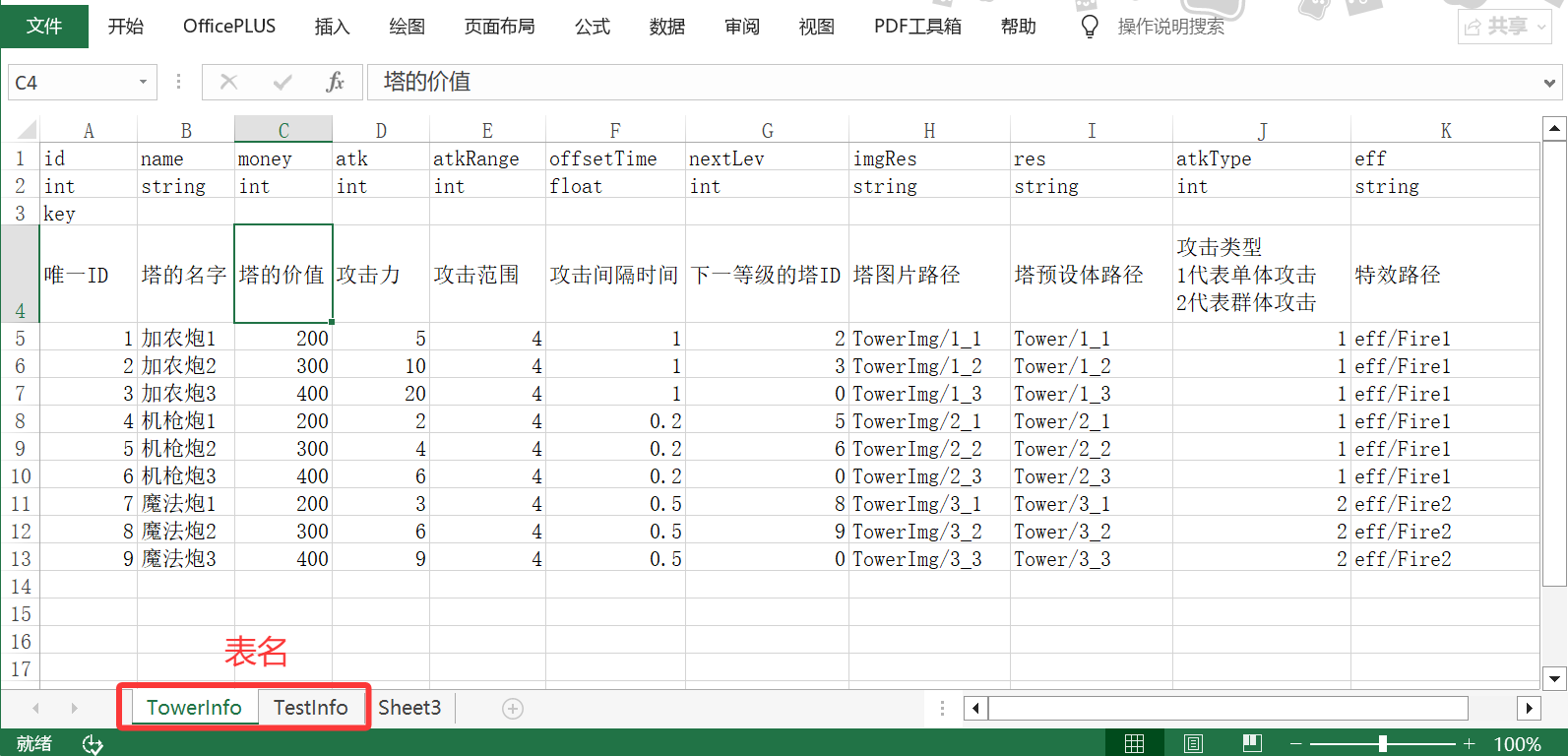 第二部分:完成
ExcelTool工具类,用于解析Excel表,生成如下几个文件:
- 数据结构类:表示表中一行的数据。
- 容器类:数据结构类的集合,表示整个表,以字典作为容器,通过Key值可以找到对应的行数据。
- 二进制文件:用于BinaryDataManager读取配置数据。
public class ExcelTool
{
    [MenuItem("ExcelTool/GenerateExcel")]
	private static void GenerateExcel(); // 解析所有Excel表并生成对应文件
    // 辅助方法
    private static void GenerateDataClass(DataTable table); // 生成数据结构类文件
    private static void GenerateDataContainer(DataTable table); // 生成容器类文件
    private static void GenerateBinaryData(DataTable table); // 生成二进制文件
}
第三部分:完成BinaryDataManager管理器类,提供加载和获取配置表的功能,并提供基础的数据加载和保存功能。
public class BinaryDataManager
{
    private Dictionary<string, object> tableDict = new Dictionary<string, object>(); // 存储所有加载的表数据(Key:容器名,Value:容器对象)

    // 用于配置数据的方法
    public void LoadTable<TContainer, TDataClass>(); // 加载表
    public TContainer GetTable<TContainer>(); // 获取表

    // 用于对象加载和保存的方法
    public void SaveData(object obj, string fileName); // 保存数据
    public T LoadData<T>(string fileName); // 加载数据
}
目前代码只支持int、float、bool、string四种基础类型,如果想要支持更多类型,可以在ExcelTool的GenerateBinaryData方法中修改,以及BinaryDataManager的LoadTable方法中修改。
3、管理器代码
- ExcelTool工具类:
public class ExcelTool
{
    public static string EXCEL_PATH = Application.dataPath + "/Excel/"; // Excel文件路径
    public static string DATA_CLASS_PATH = Application.dataPath + "/Scripts/Data/DataClass/"; // 数据结构类文件路径
    public static string DATA_CONTAINER_PATH = Application.dataPath + "/Scripts/Data/DataContainer/"; // 数据容器类文件路径
    public static string BINARY_DATA_PATH = Application.streamingAssetsPath + "/BinaryData/"; // 二进制数据文件路径
    public static int BEGIN_INDEX = 4; // 数据开始行索引(前4行是配置规则)

    [MenuItem("ExcelTool/GenerateExcel")]
    private static void GenerateExcel()
    {
        DirectoryInfo directory = Directory.CreateDirectory(EXCEL_PATH); // 创建(获取)Excel文件夹
        FileInfo[] files = directory.GetFiles(); // 获取Excel文件夹下的所有文件

        DataSet result;
        foreach (FileInfo file in files)
        {
            // 只处理.xlsx或.xls文件
            if (file.Extension != ".xlsx" && file.Extension != ".xls") continue;

            // 读取Excel文件数据
            using (FileStream fs = file.Open(FileMode.Open, FileAccess.Read))
            {
                IExcelDataReader excelReader = ExcelReaderFactory.CreateOpenXmlReader(fs);
                result = excelReader.AsDataSet();
                fs.Close();
            }

            // 获取Excel所有表
            foreach (DataTable table in result.Tables)
            {
                GenerateDataClass(table); // 生成数据结构类
                GenerateDataContainer(table); // 生成数据容器类
                GenerateBinaryData(table); // 生成二进制数据
            }
        }
    }

    /// <summary>
    /// 生成Excel表对应的数据结构类
    /// </summary>
    /// <param name="table">数据表</param>
    private static void GenerateDataClass(DataTable table)
    {
        DataRow nameRow = GetVariableNameRow(table); // 获取变量名行
        DataRow typeRow = GetVariableTypeRow(table); // 获取变量类型行

        if (!Directory.Exists(DATA_CLASS_PATH))
            Directory.CreateDirectory(DATA_CLASS_PATH); // 创建数据结构类文件夹

        // 拼接类定义字符串
        string classStr = $"public class {table.TableName}\n"; // 类定义字符串
        classStr += "{\n";
        foreach (DataColumn col in table.Columns) // 拼接所有字段
        {
            string varName = nameRow[col].ToString();
            string varType = typeRow[col].ToString();
            classStr += $"    public {varType} {varName};\n";
        }
        classStr += "}";

        // 写入并保存文件
        File.WriteAllText($"{DATA_CLASS_PATH}{table.TableName}.cs", classStr);

        AssetDatabase.Refresh();
    }

    /// <summary>
    /// 生成Excel表对应的数据容器类
    /// </summary>
    /// <param name="table">数据表</param>
    private static void GenerateDataContainer(DataTable table)
    {
        int keyIndex = GetKeyColumnIndex(table); // 获取key所在列索引
        DataRow typeRow = GetVariableTypeRow(table); // 获取变量类型行

        if (!Directory.Exists(DATA_CONTAINER_PATH))
            Directory.CreateDirectory(DATA_CONTAINER_PATH); // 创建数据容器类文件夹

        // 拼接类定义字符串
        string classStr = "using System.Collections.Generic;\n";
        classStr += $"public class {table.TableName}Container\n";
        classStr += "{\n";
        classStr += $"    public Dictionary<{typeRow[keyIndex]}, {table.TableName}> dataDict " +
            $"= new Dictionary<{typeRow[keyIndex]}, {table.TableName}>();\n"; // 定义数据字典字段
        classStr += "}";

        // 写入并保存文件
        File.WriteAllText($"{DATA_CONTAINER_PATH}{table.TableName}Container.cs", classStr);

        AssetDatabase.Refresh();
    }

    /// <summary>
    /// 生成Excel表对应的二进制数据
    /// </summary>
    /// <param name="table">数据表</param>
    private static void GenerateBinaryData(DataTable table)
    {
        if (!Directory.Exists(BINARY_DATA_PATH))
            Directory.CreateDirectory(BINARY_DATA_PATH); // 创建二进制数据文件夹

        using (FileStream fs = new FileStream($"{BINARY_DATA_PATH}{table.TableName}.dat", FileMode.OpenOrCreate, FileAccess.Write))
        {
            // 1、写入数据行数(不包含前4行的配置规则)
            fs.Write(BitConverter.GetBytes(table.Rows.Count-4), 0, 4);
            // 2、写入主键名
            string keyName = GetVariableNameRow(table)[GetKeyColumnIndex(table)].ToString();
            byte[] bytes = Encoding.UTF8.GetBytes(keyName);
            fs.Write(BitConverter.GetBytes(bytes.Length), 0, 4); // 写入主键名长度
            fs.Write(bytes, 0, bytes.Length); // 写入主键名
            // 3、写入所有数据行
            DataRow typeRow = GetVariableTypeRow(table); // 获取变量类型行(用于判断字节大小)
            for (int i = BEGIN_INDEX; i < table.Rows.Count; i++)
            {
                DataRow row = table.Rows[i];
                for (int j = 0; j < table.Columns.Count; j++)
                {
                    switch (typeRow[j].ToString())
                    {
                        case "int":
                            fs.Write(BitConverter.GetBytes(int.Parse(row[j].ToString())), 0, 4);
                            break;
                        case "float":
                            fs.Write(BitConverter.GetBytes(float.Parse(row[j].ToString())), 0, 4);
                            break;
                        case "bool":
                            fs.Write(BitConverter.GetBytes(bool.Parse(row[j].ToString())), 0, 1);
                            break;
                        case "string":
                            bytes = Encoding.UTF8.GetBytes(row[j].ToString());
                            fs.Write(BitConverter.GetBytes(bytes.Length), 0, 4); // 写入字符串长度
                            fs.Write(bytes, 0, bytes.Length); // 写入字符串
                            break;
                    }
                }
            }

            fs.Close();
        }

        AssetDatabase.Refresh();
    }

    // 获取表中的变量名所在行(第1行)
    private static DataRow GetVariableNameRow(DataTable table) => table.Rows[0];

    // 获取表中的变量类型所在行(第2行)
    private static DataRow GetVariableTypeRow(DataTable table) => table.Rows[1];

    // 获取表中的key所在列索引(第3行)
    private static int GetKeyColumnIndex(DataTable table)
    {
        DataRow keyRow = table.Rows[2];
        for (int i = 0; i < table.Columns.Count; i++)
        {
            if (keyRow[i].ToString().ToLower() == "key")
                return i;
        }
        return 0; // 默认第一个为key
    }
}
- GenerateBinaryData管理器类:
public class BinaryDataManager
{
    private static string SAVE_PATH = Application.persistentDataPath + "/BinaryData/"; // 数据存储位置
    public static string BINARY_DATA_PATH = Application.streamingAssetsPath + "/BinaryData/"; // 表数据读取路径

    private Dictionary<string, object> tableDict = new Dictionary<string, object>(); // 存储所有表数据

    private static BinaryDataManager instance = new BinaryDataManager();
    public static BinaryDataManager Instance => instance;
    private BinaryDataManager() { }

    /// <summary>
    /// 加载数据表(将数据结构类对象加载进容器中)
    /// </summary>
    /// <typeparam name="TContainer">容器类</typeparam>
    /// <typeparam name="TDataClass">数据结构类</typeparam>
    public void LoadTable<TContainer, TDataClass>()
    {
        using (FileStream fs = File.Open($"{BINARY_DATA_PATH}{typeof(TDataClass).Name}.dat", FileMode.Open, FileAccess.Read))
        {
            byte[] bytes = new byte[fs.Length];
            fs.Read(bytes, 0, bytes.Length);

            int index = 0; // 记录当前读取位置
            // 读取多少行数据
            int count = BitConverter.ToInt32(bytes, index);
            index += 4;
            // 读取主键名
            int keyNameLength = BitConverter.ToInt32(bytes, index);
            index += 4;
            string keyName = Encoding.UTF8.GetString(bytes, index, keyNameLength);
            index += keyNameLength;
            // 读取每一行信息 并 存入容器中
            Type containerType = typeof(TContainer);
            object container = Activator.CreateInstance(containerType); // 创建容器
            Type classType = typeof(TDataClass);
            FieldInfo[] fields = classType.GetFields(); // 获取数据结构类所有成员
            for (int i = 0; i < count; i++)
            {
                object dataObj = Activator.CreateInstance(classType); // 创建数据结构类对象
                // 读取每个字段
                foreach (FieldInfo field in fields)
                {
                    if (field.FieldType == typeof(int))
                    {
                        field.SetValue(dataObj, BitConverter.ToInt32(bytes, index));
                        index += 4;
                    }
                    else if (field.FieldType == typeof(float))
                    {
                        field.SetValue(dataObj, BitConverter.ToSingle(bytes, index));
                        index += 4;
                    }
                    else if (field.FieldType == typeof(bool))
                    {
                        field.SetValue(dataObj, BitConverter.ToBoolean(bytes, index));
                        index += 1;
                    }
                    else if (field.FieldType == typeof(string))
                    {
                        int length = BitConverter.ToInt32(bytes, index);
                        index += 4;
                        field.SetValue(dataObj, Encoding.UTF8.GetString(bytes, index, length));
                        index += length;
                    }
                }

                // 将加载的对象添加进容器中
                object dict = containerType.GetField("dataDict").GetValue(container);
                MethodInfo add = dict.GetType().GetMethod("Add"); // 获取字典的Add方法
                object key = classType.GetField(keyName).GetValue(dataObj); // 获取主键值
                add.Invoke(dict, new object[] { key, dataObj }); // 记录到字典中
            }

            // 将该表(容器)记录到字典中
            tableDict.Add(containerType.Name, container);

            fs.Close();
        }
    }

    /// <summary>
    /// 获取数据表
    /// </summary>
    /// <typeparam name="TContainer">数据表类型(容器类型)</typeparam>
    /// <returns>数据表(容器对象)</returns>
    public TContainer GetTable<TContainer>() where TContainer : class
    {
        string tableName = typeof(TContainer).Name;
        if (tableDict.ContainsKey(tableName))
            return tableDict[tableName] as TContainer;

        return null;
    }

    /// <summary>
    /// 保存数据
    /// </summary>
    /// <param name="obj">保存对象</param>
    /// <param name="fileName">文件名</param>
    public void SaveData(object obj, string fileName)
    {
        if (!Directory.Exists(SAVE_PATH))
            Directory.CreateDirectory(SAVE_PATH);

        using (FileStream fs = new FileStream($"{SAVE_PATH}{fileName}.dat", FileMode.OpenOrCreate, FileAccess.Write))
        {
            BinaryFormatter bf = new BinaryFormatter();
            bf.Serialize(fs, obj);
            fs.Close();
        }
    }

    /// <summary>
    /// 加载数据
    /// </summary>
    /// <typeparam name="T">对象类型</typeparam>
    /// <param name="fileName">文件名</param>
    /// <returns>加载的对象</returns>
    public T LoadData<T>(string fileName) where T:class
    {
        if(!File.Exists($"{SAVE_PATH}{fileName}.dat"))
            return default(T);

        T obj;
        using (FileStream fs = File.Open($"{SAVE_PATH}{fileName}.dat", FileMode.Open, FileAccess.Read))
        {
            BinaryFormatter bf = new BinaryFormatter();
            obj = bf.Deserialize(fs) as T;
            fs.Close();
        }

        return obj;
    }
}